
Step-by-Step Guide: How to Complete the Winbox Second Verification for Fast Withdrawals

Why Is There an Extra Verification Step?
Ever tried to make a withdrawal and suddenly found yourself being asked to complete another verification step? If you've experienced this before, don't worry, it can be confusing at first, especially when you're not sure what the platform needs from you.
For Malaysian users, online banking is part of everyday life. Whether you use Maybank2u, CIMB OCTO, Public Bank, RHB or another local banking app, you're probably familiar with checking your balance and reviewing your transaction history.
When a gaming platform requests a second verification, it may be trying to confirm your identity or check that the bank account used for withdrawals belongs to you (so do make sure the account holder's name is same as your real name bind under Winbox account to prevent any rejection of withdrawal). This additional check can help protect your account against unauthorised access and reduce the risk of sending money to the wrong person.
In this guide, we'll walk through what second verification means, what you should prepare, how to troubleshoot common problems and how to keep your financial information safe along the way.
A quick reminder: Verification procedures can differ depending on the platform and payment method you choose. Always check Winbox official instructions before taking action. Never make an extra deposit just because you think it will speed up your withdrawal.
What Is Winbox Second Verification?
In simple terms, second verification is an additional security check that may be required before a withdrawal can be processed.
Think like it as an extra checkpoint. Logging into your account confirms that you have access to your login details, while an additional check may help confirm your identity, payment details or ownership of a linked bank account.
Depending on the platform's actual procedure, verification could involve:
Confirming your registered personal details (your full name and the Winbox ID).
Checking that your bank account information is correct (check on your last 4-digit of the bank account number chosen, amount to withdraw, and etc.).
Completing an identity or account-security check.
Following an additional instruction shown on the official withdrawal page.
Some payment services use small test transactions to verify bank account ownership like charging a RM1 first but then it will be return back, it is just to check the card is still active, but this is more likely to happen on deposite stage rather than withdrawing stage, should not be assumed to be Winbox's procedure unless its official instructions confirm it.
Fun fact: When your withdrawal having issues or delayed, Winbox sometimes will have dedicated customer service team to follow up or notify you via Whatsapp or SMS or even a call, therefore please be alert on any incoming messages if you processing any withdrawal to prevent missing important notification.
Why is this check important?
There are a few reasons a platform may request additional verification:
Account protection: It can help reduce the risk of unauthorised withdrawals.
Payment accuracy: Correct account details help prevent payment mistakes.
Fraud prevention: Additional checks may help identify suspicious activity.
Security compliance: Certain payment providers have identity or transaction verification requirements.
If you see a verification request, take a moment to read it carefully instead of rushing through the process.
Before You Start: Prepare These Details
A little preparation can make the process less stressful.
Before opening the withdrawal page, check that you have:
Access to the bank account registered for withdrawals.
Your usual online banking app or official banking website.
A stable internet connection.
Access to your registered gaming account.
Any documents or information specifically requested through the platform's official verification process.
For example, if you use Maybank, open the official MAE or Maybank2u service you normally use. CIMB customers can check the official CIMB OCTO app or the bank's authorised online banking service.
Make sure you're checking the correct bank account if you have more than one.
Important: You should NOT need to share your banking password, PIN, TAC or OTP with a gaming platform's customer service agent. Never disclose these security credentials to anyone, even if they claim they can help you complete verification faster.
Also, don't top up your account simply to qualify for verification unless you've independently confirmed a legitimate requirement through official documentation and understand the financial implications.
Step-by-Step Guide to Completing Second Verification
Step 1: Log In Through the Official Platform
Start by opening the Winbox official website or application you normally use.
Check the website address carefully and avoid logging in through unfamiliar links sent through WhatsApp, Telegram, SMS or social media.
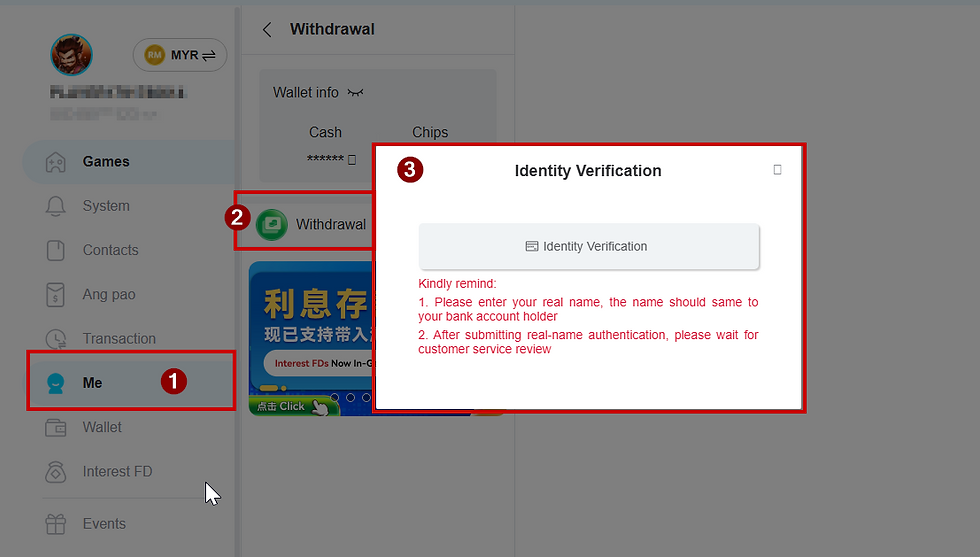
Once login Winbox, look for the account, wallet or withdrawal section.
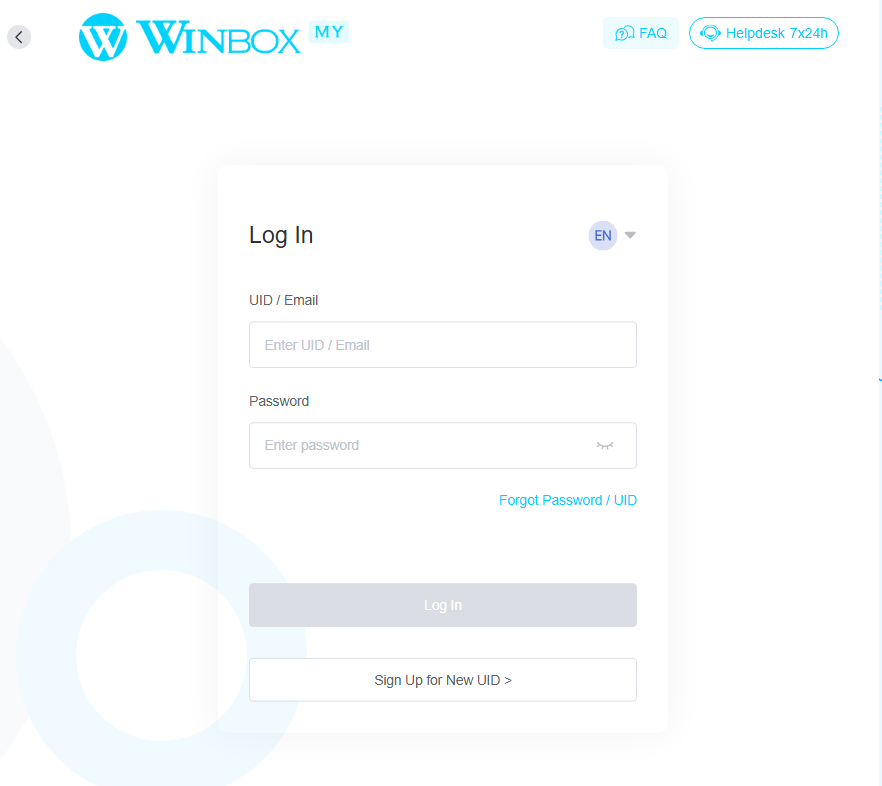
If the website looks different from what you're used to, or you're unsure whether the page is genuine, stop and verify it before entering your details.
Step 2: Open the Withdrawal Section
Navigate to the withdrawal page and read the instructions displayed on your screen.
Depending on your account status, you may see a request to verify your personal information, confirm your bank details or complete another security check.
If a message appears asking you to complete second verification, read the full explanation before proceeding.
Check the following:
Which information needs to be verified?
Is the bank account information correct?
Does the page explain what documents or actions are required?
Are there any stated processing times or restrictions?
Don't assume that every account follows the same process. If your screen shows different instructions from this guide, follow the current official guidance or contact verified support.
Step 3: Check Your Registered Bank Account
If the platform specifically instructs you to check your bank transactions, open your bank's official app and review the relevant account history.
For Malaysian users, this might mean checking the transaction history for your Maybank, CIMB, Public Bank, RHB or other registered bank account.
Look for a transaction that matches the details described in the official verification instructions.
However, don't assume that a small deposit or unusual decimal amount is necessarily a verification transaction. Check the transaction description and confirm the process with your bank or the platform's verified support if anything looks unfamiliar.
If no transaction appears, give the bank's transaction records a reasonable chance to update and check the correct account again. Avoid repeatedly submitting requests or making additional deposits just to trigger another transaction.
Step 4: Enter the Requested Information Carefully
Return to the official verification page and enter only the information requested by the legitimate process.
Double-check each field before submitting it. If the instructions ask you to confirm a transaction amount, make sure you're using the correct transaction and the exact value shown in your banking records.
If you're unsure about a number or can't identify the relevant transaction, don't guess.
Repeated incorrect attempts may cause problems on some platforms, so check whether the page provides a retry limit or instructions for getting assistance.
If you encounter an error, take note of the message and stop before making repeated attempts.
Step 5: Wait for the Verification Result
Once you've submitted the required information, look for an on-screen confirmation or a status update.
Your verification may be completed immediately or require additional review. The actual waiting time depends on the platform, payment method and any checks that are necessary.
Avoid relying on a fixed timeline unless Winbox has officially confirmed it for your particular verification process.
While waiting, keep your account details secure and avoid submitting duplicate withdrawal requests unless the platform specifically advises you to do so.
If your status remains unchanged beyond the stated processing period, contact official support and ask whether anything else is required.
Common Verification Problems and How to Handle Them
Even when you follow the instructions carefully, you may run into a problem. Here's how to handle some common situations without making things more complicated.
Problem 1: No Transaction Appears in My Banking App
First, check that you're viewing the correct bank account.
Next, refresh your transaction history or sign in again through your bank's official service. Some transactions may take time to appear, depending on the payment method and the bank's processing arrangements.
If the transaction still isn't visible:
Check whether the platform actually said a test transaction would be sent.
Confirm that the registered bank details are correct.
Contact verified support for clarification.
Don't send additional money to test whether the system is working.
Remember, at this stage please do not pandai pandai make another deposit or withdrawal to try to speed things up, the correct way is contact Winbox support team to help.
Problem 2: My Verification Was Rejected
A rejected verification could mean that some information didn't match, the wrong details were entered or another check is required.
Read the error message carefully and check which field needs attention.
Most common error will be incorrect holder's name (because new registered player usually do not believe online gamine, worried it is a scam until they really wins, further more will be the TNG Duitnow ID error, a lot of players will misunderstanding and key in the phone number as the account number for TNG, which is incorrect.)
If you're unable to identify the problem, stop and ask official support for guidance. Repeatedly entering different values without understanding the error may create further difficulties.
Never send a screenshot containing your full account number, balance, personal identification details or banking security information to an unverified contact.
Problem 3: My Account or Verification Is Locked
If you see a lockout message, don't keep trying different answers.
Instead, record the error message, note when it appeared and contact support through a channel you can independently verify as official.
Ask what caused the lockout, whether additional documentation is required and how to restore access safely.
Be cautious if anyone promises to unlock your account instantly in exchange for an extra payment, deposit or your banking credentials.
Problem 4: My Withdrawal Is Still Pending
A pending withdrawal can have different causes, including verification checks, payment processing delays or account-detail issues.
Check the official withdrawal status and any processing-time information available on the platform.
If the stated timeframe has passed, contact support with your transaction reference and the approximate submission time.
Avoid sending multiple withdrawal requests simply because the first one is taking longer than expected. Duplicate requests can make it harder to understand what's happening.
Problem 5: Someone Offers to Help Me Verify My Account on WhatsApp
Be careful.
A person claiming to be customer service may ask you to share an OTP, transfer money to a personal bank account or install an unfamiliar application.
These are warning signs that deserve extra caution.
Use only independently verified support channels. Never disclose your banking PIN, password or OTP, and never allow another person to control your online banking account.
How to Contact Support Safely
If the verification process isn't clear, contacting support is a reasonable next step.
Before getting in touch, prepare the basic information needed to explain your issue:
Your account username, if appropriate.
The error message shown on the page.
The approximate time you attempted verification.
A transaction reference, if one is available and safe to share.
Keep your message simple and factual, you do not need perfect grammar to start.
For example, you could simply ask:
"Hi, I have trouble on withdrawal. Shows an error, not sure what need to check. Could you please help check?"
Only use the direct live chat on Winbox official or a contact method you have verified through an official source previously. Don't assume that every WhatsApp number or social media account claiming to represent Winbox is genuine.
Careful! Cafeful! and Careful!
Winbox support will not ask for any OTP or password, they will just verified info.
If support asks for sensitive banking credentials, stop the conversation and verify the request independently.
Responsible Gaming: Keep Your Money and Decisions in Check
Understanding withdrawal procedures is useful, but it's equally important to look after your financial wellbeing.
Online gaming involving real money carries financial risks. A smooth verification process doesn't guarantee that a withdrawal will be approved immediately, and no platform should be treated as a reliable way to earn income.
Here are a few practical habits worth keeping in mind.
Set a Budget Before You Play
Decide how much you can afford to lose before you start. Use only money left over after essential expenses such as food, rent, bills, transport and family commitments.
Never borrow money, use emergency savings or spend money intended for necessities to fund gaming.
Don't Chase Losses
If you've lost money, it can be tempting to keep playing in the hope of winning it back.
Take a break instead. Previous losses don't guarantee future wins, and increasing your spending can make a difficult situation worse.
Don't Deposit More Just to Unlock a Withdrawal
If a verification message says you must deposit additional funds before you can withdraw, pause and verify the requirement independently.
Do not send money to a personal account or pay an unexplained fee simply because someone promises to release your funds.
A request to pay more money to access money you believe is already yours deserves careful scrutiny.
Set Limits and Take Breaks
Decide in advance how much time and money you're willing to spend. Stop when you reach those limits, even if you're feeling frustrated or hoping for one more win.
If gaming starts affecting your sleep, relationships, work or finances, consider taking a break and speaking to someone you trust.
Protect Your Personal Information
Use a unique password, secure your devices and keep your banking notifications enabled where possible.
Never share your OTP, TAC, PIN or banking password with another person. Check your bank statements regularly and contact your bank immediately if you notice a transaction you don't recognise.
Frequently Asked Questions
How long does Winbox second verification take?
The processing time depends on the actual verification procedure and your account status. Check the current information displayed by the platform or ask verified support for the applicable timeframe.
Do I need to deposit RM100 before verification?
Don't assume that you do. Only follow a minimum-deposit requirement if it is clearly documented by an official source, and carefully consider whether depositing more money is appropriate for you. A verification request alone is not a reason to top up.
Can I use Maybank or CIMB for verification?
That depends on the payment methods supported by the platform and the account details registered with it. Check the official withdrawal instructions to confirm which banks and payment methods are accepted.
What if I enter the wrong verification details?
Read the error message and check the instructions before trying again. If you're unsure or the process appears locked, contact verified support rather than repeatedly guessing.
Will second verification make future withdrawals faster?
Additional verification may help confirm account details, but it doesn't guarantee faster processing for every future withdrawal. Payment processing times and security checks can vary.
What should I do if someone asks me to pay an extra fee to release my withdrawal?
Pause before making any payment. Check the requirement through an independently verified official channel, and never transfer money to a personal account or disclose banking security credentials to someone promising to release funds.
Final Thoughts
Completing a second verification doesn't have to be confusing. The best approach is to read the instructions carefully, check your registered details, use official banking services and ask for help when something doesn't look right.
Most importantly, don't rush into making extra deposits or sharing sensitive information just to complete a withdrawal. Protecting your money and personal details should always come first.
If you choose to participate in real-money gaming, set clear limits, never chase losses and only spend what you can genuinely afford to lose. Responsible decisions matter more than completing any transaction quickly.



Comments